What should pole barn builders check before doing more email marketing?
Read every email your software already sends, on your brand, before your customers do. Good pole barn email marketing starts there: the estimate, the contract, the build updates, the supplier order and the mail a construction lender gets about each draw, with the exact subject line, at phone width. A stage that emails nobody should say so.
- Customers value work they can see. In food-service experiments, letting customers and cooks see each other raised customer-reported quality 22.2% and cut throughput time 19.2%. Build-update emails are how a building customer sees the work. Buell, Kim & Tsay, 2017 ↗
- Homeowners' top wish from their pros was better information about schedule changes, and timely communication was second, in a vendor-run survey of 6,087 homeowners. Knowing exactly what each stage sends is how you meet that wish on purpose. Houzz (vendor survey), 2022 ↗
- Communication showed the biggest gap between clients who would and wouldn't recommend their remodeler in GuildQuality's data. An email nobody checked can widen that gap without you knowing. Qualified Remodeler (GuildQuality data), 2014 ↗
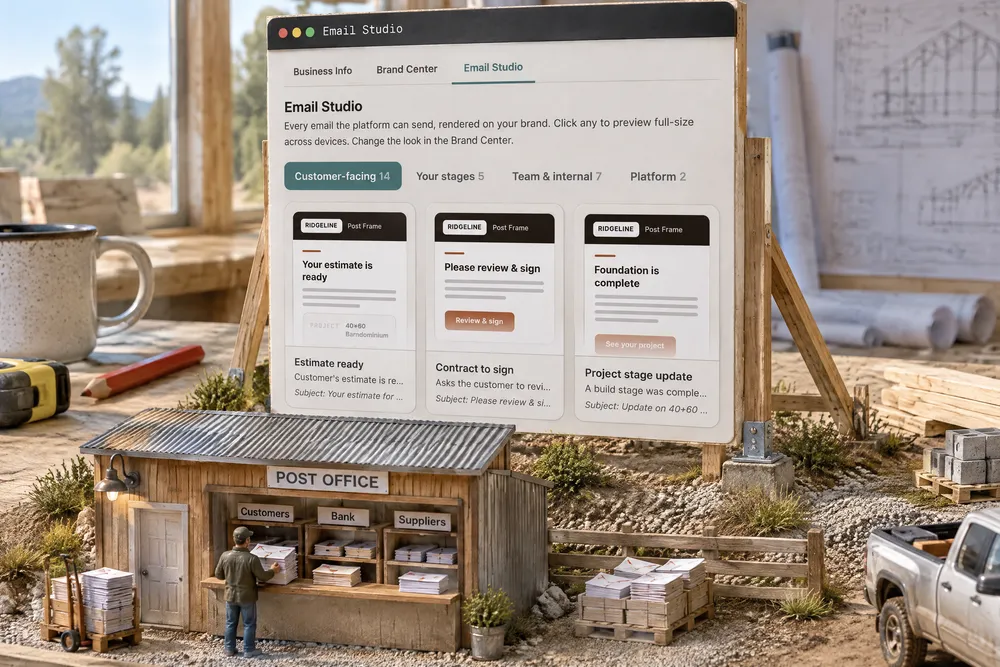
Four groups — customer-facing, your build stages, your own team, and the platform — each listing what exists, with the subject line and the full email. Customer-facing covers everything that leaves the building: the estimate, the contract, the build updates, the supplier order, and the mail a construction lender and borrower get about the loan and its draws. The stage cards are built from your own stages, including any wording you wrote and who it goes to. It is the whole set a post-frame job sends, from first quote to final draw, on your letterhead.
Also called: see every email · what emails does this send · email catalog · email templates
See every email this system can send, on your brand, without sending one
Fourteen customer-facing emails, one for each of your build stages, seven for your own team and two from the platform — sorted into what goes to customers, what goes out on your build stages, what goes to your own team, and what comes from the platform, each rendered in full on your colours and type. When a rep sends the estimate with Attach the estimate as a PDF switched on, the estimate email you read here also carries the PDF — attached, and linked in the letter, because not every inbox keeps an attachment. 'What is this thing sending my customers' is a question most software answers with a support ticket and a shrug.
A customer asks about an email you have never seen, and you have to ask him to forward it to you.
The owner reads every email before a customer does, so nothing that leaves the building surprises him. Rendering the whole set on his own brand answers 'what is it sending' and 'does it look like us' at once — without sending anything to anybody.
What your lender gets is in the catalogue too
Building on a construction loan means a bank reads your email: the lender's invitation to the loan page, the draw request when a draw is signed and sealed, the borrower's draw approval, a milestone update when a stage finishes, and a daily digest for lenders who want one. All five sit under Customer-facing, rendered on your letterhead with their subject lines. How the draws themselves work is on construction-loan draws.
The bank asks about a draw email you have never seen, and you are guessing what it said while the draw sits unpaid.
The builder knows exactly what the loan officer reads before it lands on the bank's desk — and a plain, factual, branded draw request is one the bank pays without a phone call. The lender's mail lives in the same catalogue so it is never the one email nobody checked.
One card per build stage you defined, with your own wording in it
The stage cards are built from your stage list, so if you renamed framing or wrote your own sentence for it, that is the sentence in the card. Each one names who receives it, and a stage that notifies nobody says so. Custom wording you never see rendered is custom wording you find out was wrong from a customer.
You wrote a warm note for the framing stage months ago and have never seen it; the customer has been getting it with the wrong project name.
The owner sees his own sentence for his own stage before a customer ever gets it — and catches the stage that tells nobody. The cards are built from his stage list, so what is on the card is what that stage will send.
Read the subject line before your customer does
Try itEvery card carries the subject exactly as it lands in an inbox. It is the part of an automated email a builder never sees and a customer always does — and it is the part that decides whether the estimate gets opened at all.
The estimate email goes out with a subject that reads like a receipt, and it sits unopened under the customer's grocery delivery.
The customer opens the estimate because the subject told him what it was — and the builder has read that subject first. The viewer names every email and its subject at the top, so nobody has to dig through a test inbox to find it.
Check it at phone width, because that is where it gets read
Each email renders at desktop, tablet and phone width, light and dark backdrop. A header logo that breaks or a button that runs off the edge only shows up on the narrow one — which is where nearly every customer opens it. Check it from your own phone and the viewer keeps the email's name and subject on their own line, so you always know which one you are reading.
Your logo looks fine on the office monitor and squashes into a smear on every customer's phone.
The customer on his phone in a feed-store parking lot gets an email that fits his screen, because the builder checked that width first. Nearly every customer reads on a phone, so the phone is the width that gets a check.
Change a colour and the whole set changes with it
The cards draw off the same brand the send path uses, so a change in the Brand Center shows up across every email at once. There is no second place where a template quietly keeps last year's logo.
You rebranded in the spring, and the contract email still goes out in the old colours because it lived in a separate template.
The builder changes his colour once and every email follows, so no customer gets last year's logo from a template nobody remembered. The cards draw off the same brand the send path uses — there is no second place for an old palette to hide.
- 1Pick a group — customers, your stages, your team, or the platform.
- 2Open any card to read the whole email on your brand.
- 3Read the subject line exactly as it lands in an inbox.
- 4Switch to phone width, which is where nearly everybody opens it.
- 5A stage card that notifies nobody says so out loud.
Automated email is the part of this product your customer sees most and you see least. 'What is this thing sending my customers' is a question most software answers with a support ticket and a shrug. Rendering the whole set on your own brand answers that and 'does it look like us' at once — without sending anything to anybody.
- There was no inventory of platform-sent email.
- Per-stage customer wording could not be checked without completing a stage.
- Nobody could tell which stages were silent.
Desktop, tablet and phone preview
A toggle above the preview that redraws the email at three widths, plus arrows to step through the emails without leaving the screen. Sun and moon switch light and dark.
Your stage emails, as they will actually send
Built from your real stage list. Each card renders the customer's progress email for that stage with your own heading and body in it, names who receives it, and flags a stage that is silent or still following your company-wide settings.