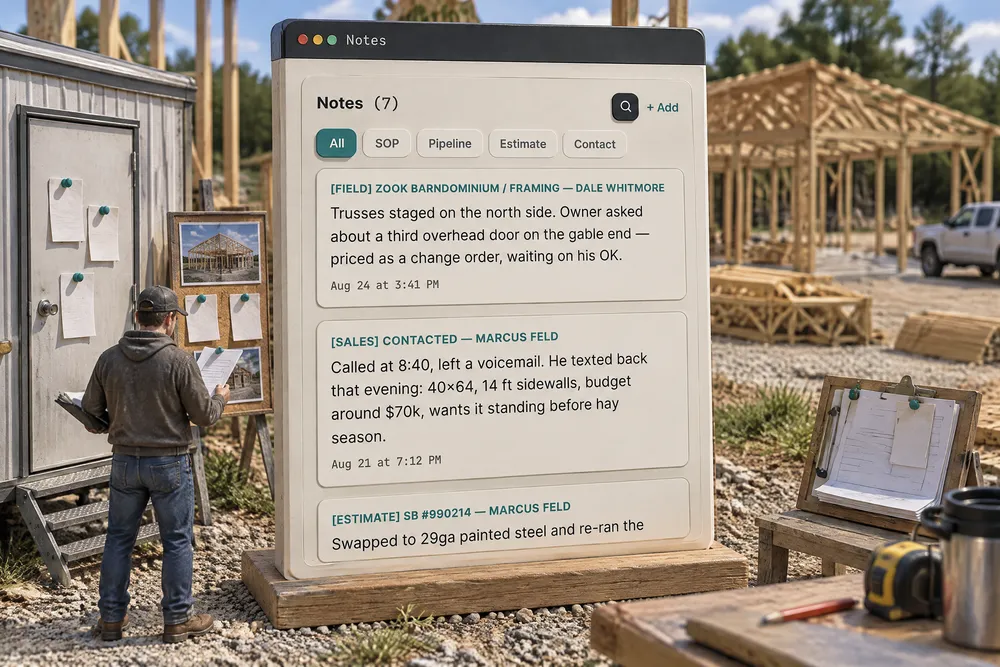
How should post frame CRM notes be organized?
Keep all post frame CRM notes in one stream on the person, whether it was written on the contact, the sales card, the job, the estimate or a jobsite photo, each tagged with where it came from. The sales promise and the field note then sit side by side, you can filter to one kind, and every note is signed by whoever wrote it.
- Memory fades and gets rebuilt, so a note written later is weaker than one written on the day. A construction trade association's guidance says same-day reports beat week-later reconstructions, and unlabeled phone photos are hard to use under pressure. ABC Carolinas, 2026 ↗
- When the record is thin, each side remembers the deal in its own favor. Babcock and Loewenstein showed this self-serving bias causes bargaining standoffs in experiments and in a field study of teachers' contract talks. Babcock & Loewenstein, 1997 ↗
- Notes scattered across texts can still count. A construction law firm warns that texts and group chats can serve as notice, that a field person's text approving work can obligate the company, and that digging texts up later is costly. Peckar & Abramson, 2026 ↗
- Disagreements cost hours when nobody can find what was said. In the FMI and PlanGrid study (mostly larger commercial firms), staff spent about 4.7 hours a week resolving conflicts on top of 5.5 hours looking for information. FMI & PlanGrid, 2018 ↗
One list of notes per person. Write with bold, headings, bullets, numbers and colour, because a site note is usually a list. Every note carries the place it was written, so you can pull up just the field notes or just the sales notes without giving up the single view — on the contact, on the pipeline card and in the project window. Search highlights matches where they sit. Exclusively post-frame and barndominium builders — so the tags are the places a builder actually writes from: the sale, the estimate, the stage, the field.
Also called: customer notes · job notes · note history · notes in three different places
Notes written on the job, the card, the estimate and the contact land in one stream
Everything anybody has written about a person reads as one list, each note tagged with where it was written. Pull it down to just the field notes or just the sales notes when you need to, without giving up the single view. Each note is signed by whoever wrote it — not by the account owner — and the stream reads every note on the account back after a reload, so a business that imported years of history from its old system loses none of it past some invisible cut-off. Notes in three places is how the gate code ends up somewhere nobody thinks to look.
You know somebody wrote down what the owner agreed to about the third overhead door — you just don't know whether it went on the job, the card or the contact, so you read all three.
Nobody has to decide where a note belongs before writing it, and nobody has to search three places to find it — the rep standing in the driveway reads the gate code the office wrote last month. The sorting happens when you read, not when you write.
Writing on a jobsite photo files itself as a field note
Try itWhen the crew or the office writes on a photo — "header is a triple 2×12, don't cut until the change order is signed" — that writing lands in the notes stream as a Field note, filed under the customer, with the photo beside it. Tap the photo and it opens with the writing over it. Lines and arrows alone don't make a note, and edit the writing and the note follows. How the marking works is on mark up a photo.
The crew lead writes 'don't cut until the CO is signed' on a photo, and the office never sees it because it lives in the gallery, not in the notes.
What the crew notices on site reaches the office without anyone retyping it — the office reads it in the same list as everything else, and the crew lead feels heard instead of ignored. The note is changed on the photo, not in the list, so the words and the picture can never disagree.
A note keeps where it came from — on another device, on the card and on the job
Try itThe tags used to live only in the browser that wrote them. The same note read back on a phone came home as a plain "Note", and the categories quietly collapsed. They are stored with the note now — which is the only reason the filters mean anything. The project window reads the customer's notes too, with the same origin chips and a Search notes box — it is the Notes card under Schedule & work, and typing "notes" into the window's Find a section box opens it — so opening the job shows the sales note about the budget and the crew's framing note side by side.
The note you filed as a field note at the desk reads back as a plain note on the phone that evening — and the job's Notes section is empty because everything was written on the customer.
The project manager opens the job and sees everything sales promised, without asking anyone — so the customer isn't told something different on the jobsite than he was told at the kitchen table. The origin travels with the note, so a phone, a laptop and the project window all show the same list.
Bold, headings, bullets, colour — and a picture pasted straight in
The editor handles the formatting a real note needs, and pictures go in three ways: the camera and picture buttons on the toolbar, pasting a screenshot with Cmd or Ctrl-V, or dragging a photo onto the note. It lands where you were typing, uploads into your own storage against the customer, and a note that is nothing but a picture still saves. The same works on the deal card, the Contacts notes panel and a project stage's notes — on a desk or a phone. Search highlights matches where they sit in the stream rather than dragging you off somewhere else.
You are moving a customer's history over from the old system one screenshot at a time, and every note box wants you to save the image, find the file and upload it.
A framing walkthrough stays six numbered items, so the crew lead doesn't lose the fourth one in a run-on paragraph — and a rep moving history over from another system pastes one screenshot per card instead of ten clicks per card. Only an image file pastes as a picture; text and formatted text paste as text, and a dropped file that is not a picture is refused with a reason instead of the browser opening it over your unsaved note. The colours are a fixed set chosen to stay legible on the app's own background instead of an open colour wheel that produces yellow on cream.
Stage moves and system events go to the timeline, not into the customer's thread
Who moved the deal, exactly when, and which steps were done or skipped shows on the contact — drawn from the same place the pipeline card draws it, so the two can never tell different stories about one job. Meanwhile the message thread stays a record of what was actually said to the customer, not a log.
You scroll back through the customer's thread hunting for what you actually promised about the door, and it is buried under a hundred entries nobody ever said out loud.
The rep scrolling a customer's thread finds what was actually said to him, not a hundred system entries — so the promise about the door is found in seconds. Two records with two jobs: the history side also counts how long the job sat in each stage, so a lead going cold reads as a number instead of a feeling.
- 1Write a note from wherever you are — the contact, the card, the job, the estimate.
- 2Writing on a jobsite photo files itself as a field note, with the photo beside it.
- 3It lands in one stream on that person, tagged with where it came from.
- 4Filter to Contact, Pipeline, Project, SOP, Estimate or Field — on the contact, the card or the job.
- 5Search highlights the match in place rather than sending you elsewhere.
- 6A note that is nothing but a photo still saves.
- 7Paste, drag or snap a picture straight into a note — a screenshot from another system, a photo from the camera roll, or one taken there and then.
- 8Every note is signed by the person who wrote it, and every note comes back after a reload — however many thousand the account holds.
Notes about one person get written from wherever the builder happens to be standing. The tag saying which place it came from lived only in the browser that wrote it — so open the same note on a phone and it came back as a plain "Note". The categories quietly collapsed, and the gate code ended up in a stream nobody thought to filter. Now the origin is stored with the note, which is the only reason the filters mean anything — and the job reads the customer's notes, so opening the project no longer shows an empty Notes section.
- Notes fragmented across surfaces
- Origin tagging that existed only in one browser's cache
- Field notes written on photos living apart from everything else