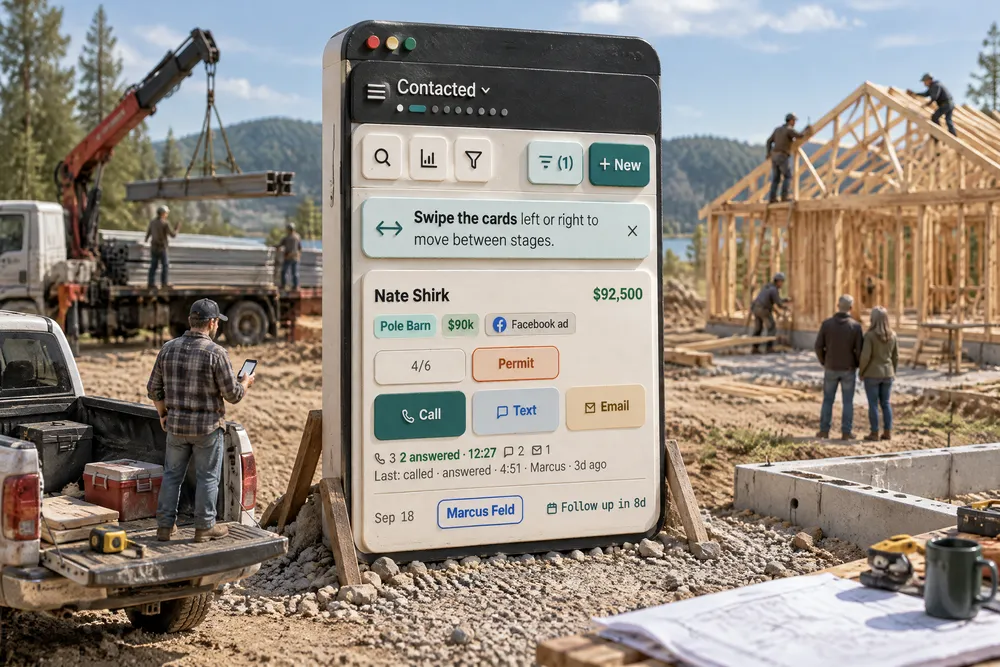
Can you really run a pole barn business from your phone?
Yes, if every screen is built for a phone instead of shrunk onto one. To run a pole barn business from your phone you need the pipeline one stage at a time, Call, Text and Email on every new lead, a deal that opens on its conversation, and a customer's text you can answer from the notification. Nothing should be missing because you're not at a desk.
- The first reply decides who gets the conversation: firms that reached a web lead within an hour were nearly 7 times as likely to qualify it as firms an hour slower, and about 60 times as likely as firms that waited a day or more. A builder in a truck answers from the phone or not at all. Oldroyd, McElheran & Elkington, 2011 ↗
- Missed calls rarely leave a trail: on one lead vendor's own platform, 26% of calls to contractors went unanswered and fewer than 1 in 6 of those callers left a message (vendor data). The rest called someone else. Service Direct (vendor), 2022 ↗
- Owners lose their days to interruptions: in a survey of 323 business owners across industries, 63% worked more than 50 hours a week and unscheduled communications were the top time-waster (33%). Answering straight from the alert keeps each one short. The Alternative Board, 2015 ↗
Every builder screen in Leads 2 Build works on a phone — not a shrunk copy of the desktop, and not a cut-down version with the hard parts missing. The sales pipeline shows one stage at a time that you swipe through, with Call, Text and Email on every new lead and every board option in one sheet from the bottom. A deal opens on its conversation, with the details on one side and the follow-up on the other, a swipe away, and a customer's text can be answered straight from the notification. Pickers open in the middle of the screen, and every tap presses in so you know it landed. Leads 2 Build works exclusively with post-frame and barndominium builders, and their day is a truck, a yard and a slab — not a desk. It all runs in your phone's browser today, and the Leads 2 Build app for iPhone and Android is in testing.
Also called: mobile app · construction mobile app · CRM on my phone · pipeline on a phone · work from the truck · mobile pipeline
One stage at a time, swiped with a thumb
On a phone the board is one stage at a time. Swipe the cards to the next stage; the header names the stage and shows a dot for each stage so you know where you are. Each card carries when the lead came in, how long it has waited and who has tried to reach them, so the oldest unanswered lead is the one you see. The desktop board is the full sales pipeline.
A five-column board on a phone is five columns you can't read, scrolled sideways with a thumb that keeps opening cards by accident.
A rep between appointments needs one question answered — who is waiting on me — and gets it in one glance, so the lead that came in at 7 a.m. is called before lunch. One stage on a full-width screen answers it; five squeezed columns do not.
Call, Text or Email from the card
Try itNew leads carry three buttons in a row: Call in teal, Text in blue, Email in amber, each with its own icon. Text and Email open the deal with that message box ready to type in. A button greys out when the lead has no number or email, so the row never changes shape.
Some customers say don't call me — and a card with only a Call button turns that into three taps and a search.
The rep replies the way the customer asked to be reached, in one tap, while the lead is still warm — speed to the first reply is the whole game on a new lead. A greyed button instead of a missing one means the thumb always finds Call in the same place.
The deal opens on its conversation
Open a deal on a phone and the conversation fills the screen, with Call beside the filters. The Contact and Estimate buttons in the header shrink to icons on a narrow phone, so the customer's name keeps its width. Swipe right for Details — the contact, the lead form, photos, the stage checklist, the building type and how strong the lead is. The thread is kept on the device, so reopening a deal does not start with a loading spinner, and back is instant. It is the same thread as the customer conversation on the desktop.
Seven tabs along the top of a phone screen hide the one thing you opened the deal to do — read what they said and answer it.
The rep reads what the customer last said before he rings back, so the call starts where the last one ended instead of with 'remind me where we were'. The conversation is the work; the details are reference, a swipe away.
The follow-up is one swipe from the conversation
Swipe left on a deal for Follow-up: the latest note, the next task and when it is due, the estimate, the permit check and the rest — each a card you tap into. On a sales lead, Sequences sits under Tasks: which automatic follow-up emails and texts the lead is in, how far each has got, and a way to take them out or put them in one — from the truck. Notes, tasks and the estimate used to be three screens apart on a phone.
The rep is on the phone with the customer and the note about the door change is two menus away.
Whatever the next call depends on is in reach before the rep dials, so he never promises a date the estimate says he cannot keep. One drawer instead of three screens is the difference between doing it in the truck and leaving it for the office.
Fill in what's missing without leaving the card
A lead that came in with a number and no email used to have nowhere on the card to put one. Now, where a missing detail would sit, the deal's Details shows + Add email or + Add phone number: type it, Save, and it is written to the person's own record, so it is on the contact record, the conversation and every other screen at once. The note box takes pictures the same way: take a photo, pick one from the phone, or paste a screenshot straight into the note, and each note is signed by whoever wrote it. It is the same note stream the office reads.
A lead brought over from the old system has a phone number and no email, the customer reads his address out in the yard — and there is no box on the card to put it in.
The rep fills the gap on the card he is already holding, while the customer is standing in front of him, instead of writing it on his hand for the office. Saving to the person rather than to the card means one fix reaches every screen that shows them, so nobody types the same email twice.
Every board option, in one sheet built for a thumb
Try itOptions opens a sheet from the bottom with labelled sections of thumb-sized rows: show as a board or a table, mix and match filters (stage, strength, owner, town, source, age, last touch — each one is or is not), whose leads (everyone's, yours, or see one person's), how far back the board reaches — all time, or leads that came in during the last 30, 60 or 90 days, six months or a year — sort, building type, strength, previous owner and waiting leads. Done and Clear all stay pinned at the foot. On the narrowest phones the Options button keeps its icon and its count and drops the word, so + New is never pushed off the edge.
Two years of old leads on the board means scrolling past last spring's tyre-kickers to find this morning's call.
A rep can cut the board down to this week's work from the truck, without waiting to get back to a desk — and a manager can look at one rep's leads from a phone. Nothing the desktop board can do is left off the phone; it is laid out for a thumb instead.
Choices open in the middle of the screen
Try itTap the stage name and the stage list opens centred, with space above and below — every stage with its colour and count — not pinned to the bottom edge. Longer controls — filters, stats — slide up as a sheet you can swipe away. Each one is a shared control, so it behaves the same on every screen.
Every screen that rolls its own pop-up behaves a little differently, and a phone user learns the app one surprise at a time.
The thumb lands on the row without stretching, so a rep jumps to Estimate Sent one-handed while the other hand holds a tape measure. One set of controls, built once, is the only way forty phone screens feel like one app.
Answer a customer straight from the alert
When a customer texts, the bell carries Call, Text and Email on the message — only the ways that customer can be reached — and the reply opens right over the list: what they said, a box to answer, and the way into the full conversation. How alerts are routed, and who gets which, is set on the notifications grid.
A customer asks to move Thursday's pour; by the time the rep finds the conversation, he has driven to the next job and forgotten.
The rep answers in the moment, from the screen the alert already put him on, so the customer is not left waiting until evening. No hunting for the contact, no extra screens — the reply is where the question is.
Every tap answers back
Try itButtons, links and pipeline cards press in when you touch them, so you can see the tap landed. On Android the tap also gives a small haptic tick, in the browser and in the app. Scrollbars appear while you scroll and fade a second later.
On a phone, a tap that gives no sign it landed gets tapped again — and a second tap on Send is a second message.
A rep who sees his tap land never taps Send twice, so customers never get the same text two times. Confirmation is part of the design system, so every control has it without anyone remembering to add it.
Nothing is desktop-only
Every builder screen has been scored on a phone against a written standard: every control reachable, no control hidden from a phone, no sideways page scroll, one column where two would squeeze, thumb-sized targets, and wide tables turned into cards. All of them pass — down to Settings, which opens on your own profile with every section a tap away. Estimates, the screen that scored lowest, went from 4.5 to 9.3 out of 10. Every screen was then checked again on a 360-pixel phone with the text turned up, and anything that overlapped, ran out of its box or was cut to a few letters was fixed — money reads as money, names wrap instead of clipping, and buttons stay on the screen.
The phone version of the estimates screen had become a separate, cut-down copy — and seven controls an owner needed simply were not on it.
The owner can fix a setting, approve a price or check a crew from the truck instead of saving it for the office — and the office never has to explain that 'you can't do that on the phone'. A control on one layout and not the other is a feature removed, so both layouts are built from the same blocks.
- 1Open the sales pipeline on your phone and it shows one stage at a time — swipe left or right between stages, or tap the stage name for a centred stage picker.
- 2Each card shows when the lead came in and how long it has waited, who owns it, and who has tried to reach them.
- 3Call, Text and Email sit side by side on new leads, each its own colour — a customer who asked not to be called is one tap from a text.
- 4Options opens one sheet with every board setting: board or table, mix-and-match filters, whose leads, how far back the board reaches, waiting leads, previous owner, sort.
- 5Open a deal and the conversation fills the screen. Swipe right for Details and left for Follow-up.
- 6A lead with no email or no number on file shows + Add email or + Add phone number in its Details — fill it in from the card and it is on the person's record everywhere.
- 7A customer's text in the bell can be answered right there — Call, Text or Email — without hunting for the conversation.
- 8Every tap presses in; on Android it also gives a small haptic tick.
A builder's day is spent in the truck, in a customer's yard and on a site — not at a desk. The phone version of most business software is the desktop squeezed until it fits: a board five columns wide on a screen one column wide, a record with seven tabs across the top, and the controls that did not fit quietly left off. On a phone those missing controls are the ones you needed. So every builder screen was scored on a phone against a written standard — every control reachable, nothing hidden from a phone, no sideways scrolling, tables that turn into cards — and reworked until it passed. The pipeline and the deal were then rebuilt for the phone rather than adapted to it, because the two things a rep does between appointments are see who is waiting and answer them.
- Desktop screens squeezed onto a phone until they are unusable
- Controls that exist on the computer but are missing on the phone
- Working a lead from the truck means waiting until you are back at the office