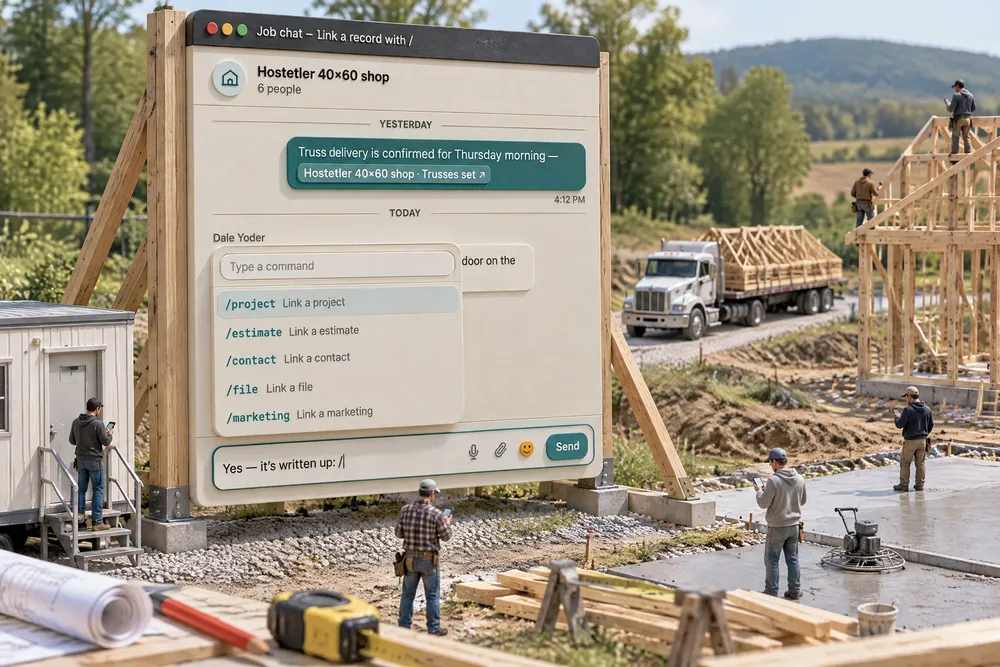
What should a post frame team chat app do that a group text can't?
A post frame team chat app should give every job its own chat and let you link the exact project, stage, invoice or change order inside a sentence, so nobody has to ask "which one?" Ours shows each reader only the links they're allowed to open, delivers messages in about a second, puts the homeowner's messages on a Customer tab, and texts anyone away once per conversation.
- Job talk scattered across texts turns into hunting. In the FMI and PlanGrid study (mostly larger commercial firms), staff spent about 5.5 hours a week looking for project information, and only 18% of firms consistently used apps beyond email, text and phone. FMI & PlanGrid, 2018 ↗
- A casual message can carry real weight. A construction law firm warns that texts and group chats can count as notice, that a field person's text approving work can obligate the company, and that recovering those messages later is costly. A chat tied to the job keeps that record where it belongs. Peckar & Abramson, 2026 ↗
- Every "which job did you mean?" is an interruption, and interruptions wear people down. In Mark, Gudith and Klocke's experiment, interrupted workers sped up to compensate but reported more stress, frustration and effort. Mark, Gudith & Klocke, 2008 ↗
An internal chat for everybody who works for you — office, sales, project managers and crews — with direct messages, groups and a chat for every job — and every job's chat has a Customer tab beside its Team tab, where the homeowner's messages from their project page arrive. Type / in any message and pick a record: a project, then what about it — a stage, a checkpoint, a task, an invoice, a change order, the crew's acceptance contract or the weather — and it drops into the sentence as a link. Click it and you land on that exact thing. Each reader only gets a link they are allowed to open; everyone else sees the words. Our own support team can do the same in your conversation with them, linking your job instead of describing it. Messages arrive in about a second, with a red count on Chat; anyone away from the screen gets one text per conversation; and Call in a direct message rings the other person’s dashboard, with every call recorded in the conversation. It runs in a widget on every screen, on the Chat screen, inside each project window, and on the crew's no-login field link. Built exclusively for post-frame and barndominium builders, so what you link is what your jobs are made of — the Trusses set stage, the truss-bracing checkpoint, the change order for the extra overhead door.
Also called: team chat · internal chat · crew chat · job chat · project chat · group chat · direct messages · slash commands · chat widget · L2B Chat
Type / and link the exact thing you mean
Try itIn any message, type / and a picker opens over the box. Pick an area, then the record, then what about it, then which one: /project → Hostetler 40×60 shop → Change order → CO-3 · Extra overhead door goes into the sentence as a link. Send it, and anyone who clicks lands on that change order, with the conversation still there behind it. Stages are read from the job's schedule itself, listed in the order they happen with the day each starts, so Trusses set · Starts Oct 1 is the one you mean, not a guess.
"The door change on Hostetler's" sends three people looking for three different documents.
Nobody has to hunt for the record or ask "which one?" — they tap and they are looking at it. The person who asked feels answered in one message, and the office takes fewer calls and frames fewer wrong doors. The link is built the way the app's own notifications open a job, so it works copied into a browser too.
A link only for the people allowed to open it
The same message reads differently to different people. Carla links CO-3 and the Walls & girts stage in the job chat: the owner gets two links. Dale, the crew leader, can open the stage but not the change order — so he gets the stage as a link and the change order as words, with nothing to click. It is the line drawn by roles and permissions — the person's role as your account set it, any preset they were given and their own exceptions — applied inside every message.
Putting an invoice in the crew chat either shows the crew the money or means running a second, office-only conversation.
The office can talk money in front of the crew without worrying, and the crew do not feel shut out — they still read the whole sentence. One chat for everyone keeps people on the same page instead of whispering in side threads. Underneath, a reader who cannot open the record is never sent its address at all, and the chat asks the same permission check the rest of the app does, so the two can never disagree.
Not just the job — the stage, the invoice, the change order
"That project" is too blunt. After the record, the picker asks What about it? — the project itself, a stage, a checkpoint, a task, the crew acceptance contract, an invoice, a change order or the weather. Each opens where you would expect: a stage opens its window, a checkpoint opens its stage at that checkpoint, an invoice or change order opens the job's Billing with that one open. A part you cannot open is not offered at all — a crew leader never sees Invoice or Change order in the list.
A menu full of locked items tells people exactly what they are being kept out of.
Nobody likes seeing a door they cannot open. Leaving locked parts off keeps the picker short, nobody feels watched or left out, and the money stays with the people who handle it. Each part is checked on top of the job's own permission.
Your hands never leave the keyboard
↑ ↓ move, Enter takes the highlighted row, and Space or Tab finishes a command the moment only one still matches — type /e, hit Space, and you are searching estimates. Escape or Backspace steps back one level instead of throwing the whole pick away.
A picker that needs the mouse at every step gets abandoned by the second week.
Fast tools get used; slow ones get skipped. When linking is as quick as typing, people link instead of describing — and every message they send is clearer for it. Space only finishes a command while one still matches, so it never fights your typing.
The link sits in your message as one solid piece
In the box, a link is not text you can half-delete — it is one piece. The cursor steps over it, one Backspace removes it whole, and pasting brings in words only. What you see in the box is exactly what gets sent.
A link that can be half-erased ships a message pointing at nothing.
People trust what they can see. The link looks like one thing and behaves like one thing, so nobody sends a broken reference and then has to explain it. What is in the box is exactly what goes out.
Every job has its own chat, with the right people already in it
Each job gets one conversation, named after the job. Everyone going on it with a crew, the project manager and anyone assigned to the project are in it automatically — take someone off the job and they drop out, while the history stays. Admins and project managers can open any job's chat and join quietly, notified only when they are mentioned. The Projects tab lists them all.
Job talk lives in personal group texts with the wrong people in them — and leaves when the phone does.
Nobody has to remember to add the new guy, and nobody is left out of a job they are on — being on the job is what puts you in the conversation. The history stays with the job, not on somebody's phone, so it does not walk out the door when they do.
Crews read and write it from their field link — no login
Most framers will never install an app. On the crew's field link there is a Job chats tab with one card per job they are on and an unread count. They open it, read, and reply in big type with a Send button they can hit with gloves on — the same conversation the office is writing in.
The people who most need to hear about a change are the ones with no login and the furthest from a desk.
Crews feel part of the job, not an afterthought. Nothing to install and no password to forget means they actually read it — and the office stops repeating itself on the phone.
The job's chat inside the project window
Open a job in the project window and its Project chat is one of its sections. Closed, it already says how many are unread and the last line; open, it shows the latest messages and takes a reply. Open in chat jumps to the full conversation, photos and history included.
Checking on a job meant leaving the job to go and find the conversation about it.
A project manager scanning jobs sees at a glance whether anything is waiting, so nothing sits unanswered and he does not have to open every chat to check. It is the same conversation, so a reply here reaches the crew's phone.
A job's chat has two tabs: Team and Customer
Try itEvery job's chat has Team and Customer tabs under its header. Team is your crew and office talking among themselves. Customer is the homeowner's conversation from Message your team on their project page — the same people are in it, and a line says so plainly: The homeowner reads everything written here. Internal talk belongs in Team. A red badge sits on whichever tab has something waiting, and in the Projects list the job's row counts unread across both tabs and marks CUSTOMER when the homeowner wrote.
The crew's blunt talk and the homeowner's questions end up in the same thread — or the homeowner's question ends up somewhere the crew never looks.
One place per job for both conversations, and no doubt about who's reading. The crew can be blunt in Team; whoever answers the homeowner knows exactly who they're talking to — so nothing internal slips out, and no homeowner question waits for someone to notice it.
The homeowner's thread in the project window too
Try itIn the project window the Customer tab has a compact view of its own — Homeowner messages, beside Project chat. Closed, it shows the unread count and the last line; open, it takes a reply. Open in Chat jumps to the full Customer tab, photos and history included.
Checking whether the homeowner needed anything meant leaving the job to go and find their messages.
A project manager checking a job sees the homeowner waiting without opening Chat — so a customer's question never sits overnight because nobody looked.
Chat on every screen, without leaving what you are doing
Try itOn a computer, a Chat button sits in the bottom-right of every screen with your unread count in red — and clicking it opens straight on whoever is waiting, the most recent if several are. It opens the widget over whatever you are doing: Team for your own people — split into Direct, Groups and Projects — and Leads 2 Build for your conversation with our team. + New starts a conversation right there, Expand opens the full Chat screen, and you can drop a file onto a name to send it. On a phone, Chat is in the menu.
Answering a crew question meant abandoning the estimate you were halfway through.
Answering in a few seconds without losing your place means people answer fast — and crews who get fast answers stop guessing on site. It remembers whether you left it open, so a running conversation stays with you.
It lands the moment it is sent
Try itA message shows up about a second after it is sent — no refreshing, no waiting for the screen to check. While the widget is shut, a pop-up shows who wrote and what, over a red count on Chat; in a background tab it is a desktop notification. Click either and the conversation is open.
A question from the yard sat unseen until someone happened to open chat.
A question answered while the person asking is still standing at the truss pile saves the trip back — and a team that sees fast answers keeps asking instead of guessing.
Away from the screen? A notification — or one text
Turn on notifications on your phone (Android in Chrome; iPhone after adding Leads 2 Build to the Home Screen) and a message you miss pops up like a text, free. Without notifications on, it texts your phone instead — who wrote, what they said, and a link straight back to the conversation. One alert per conversation until you read it, and never more than one text every few minutes, so a burst of messages is still one buzz. Muting a conversation stops it. On a job's Customer tab, crew members hear the homeowner by phone notification and the bell only — never a text; the text backup is kept for the office.
Anyone not sitting at the dashboard missed team messages until they next logged in.
The person on the roof hears about the one message that matters without being trained to ignore their phone by a stream of buzzes.
Call them — or video call them — from the conversation
Try itPress Call — or Video to see each other — in a direct message and the other person’s dashboard rings, on whatever screen they have open, with Answer and Decline — and Answer audio-only when it is a video call. Calls go straight between the two browsers, so they cost nothing however long you talk. On a call, Turn camera on makes it a video call and turning the cameras off makes it a voice call again — either of you, any time. Every call leaves a line in the conversation: Call · 4m 12s (or Video call · 4m 12s if a camera was on) when you talked, Missed call from … in red on their side when they did not — with Call back beside it — and No answer on yours. Who called, how often and for how long stays with the conversation it was about. A video call opens a floating window that fills your browser window at a click, with mute, camera off and flip camera on a phone — and three dots beside the mic and the camera to switch microphone, speaker or camera mid-call (every call starts on your system defaults). Share your screen on a voice or video call — no camera needed — and both of you can draw on it: A for an arrow, D to draw, C to clear. Helping someone? Ask for control of their Leads 2 Build tab; once they press Allow, you can click and type for them, and a Stop bar stays on their screen until they end it.
Calling a teammate meant leaving the conversation for a personal phone, with no record of who called whom or who never picked up.
When a call is one click from the question, people pick up instead of typing a paragraph — and a missed call in red is a promise to call back that nobody can lose.
Say the message instead of typing it
Tap the microphone beside the message box and talk. Your words are typed into the box for you to check before you press Send. It uses your browser's own speech typing, and the button only appears where the browser supports it.
Typing a paragraph on a phone with cold hands is how messages turn into "call me".
Talking is easier than typing with cold, dirty hands, so the message gets sent instead of turning into "call me". The words land in the box first, so a misheard word gets fixed before anyone reads it.
A message from our team opens the conversation it is about
When someone on the Leads 2 Build team writes to you, it shows in your notifications. Click Open chat and the widget opens on that conversation — on a phone, the Chat screen does. If that notification reaches you by email, just reply to the email: your answer is posted into the same conversation, as you, and our team is told. Messages from your own team show as unread counts on the Chat button, the Chat menu item and each tab.
A reply from support that sits unseen somewhere else keeps a problem open a day longer than it needs to be.
When a reply opens right where you need it, you deal with it now instead of later — and an emailed answer lands with the person who asked, not in your customer inbox. Problems get closed the same day, and you feel looked after instead of chasing support.
Our support team links your job instead of describing it
Try itWhen someone on the Leads 2 Build team answers you in chat, they can type / and link your own records — the project, a stage, a checkpoint, an estimate, a contact or a file — right in the sentence. Only our staff who can already open your account to help you get the picker, and it searches your account and nothing else. Your people open each link under their own permissions: the owner gets the checkpoint and the invoice as links; a crew leader in the conversation gets the checkpoint as a link and the invoice as words, exactly as in a message from a teammate.
Support tells you which checkpoint is holding a job up, and you spend five minutes finding the one they mean.
Support was the one conversation where the person writing could see your records but could only describe them — "the bracing checkpoint on the Hostetler job" — and you had to go and find it. Now the link carries your account with it, so it opens on the right screen for you, and the permission check is the same one that runs on every link your own team sends. Our staff see nothing through the picker that they could not already see when helping in your account.
Direct messages, groups and named channels
Try itNew lists everyone on your team. Pick one person for a direct message, several for a private group with a name, or switch on Make this a named channel. People without a login are marked No login before you send — they will not see a direct message until they can sign in, which is why each job's chat, on the field link, is the one that reaches the crew.
A message to a framer with no account looks sent and is never read — and nobody finds out until it matters.
Nobody likes finding out they never told someone something they thought they had. Marking No login up front sets the right expectation — and points you to the job's chat, which does reach the crew.
- 1Type / in a message and pick an area — /project, /estimate, /contact, /pipeline, /file or /marketing. You are only offered the areas you can open.
- 2Pick the record, then what about it: the project itself, a stage, a checkpoint, a task, the crew acceptance contract, an invoice, a change order or the weather — then which one, like CO-3 · Extra overhead door. Stages come straight off the job's schedule, in order, each with the day it starts; a checkpoint shows the stage it belongs to.
- 3It lands in your message as one solid link. Send it, and anyone who clicks is taken straight to that record — the stage window, the change order, the invoice — without losing the conversation.
- 4Every reader gets the link only if they can open it. Someone without access to invoices sees the words, and nothing to click.
- 5Every job has its own chat, named after the job, with the crews going on it, the project manager and anyone assigned — kept in step as people come on and off the job.
- 6Each job's chat has two tabs: Team for your own people and Customer for the homeowner, who writes from their project page. The Customer tab says plainly that the homeowner reads everything in it, and carries a red badge when they write.
- 7Crews read and write their job chats from their field link, no login; the office writes in the same conversation from the Chat screen, the widget or the project window.
- 8On a computer the Chat button sits on every screen with a red unread count: clicking it opens on whoever is waiting, and a pop-up shows each new message while the widget is shut. Team and Leads 2 Build tabs, + New to start a conversation, and a microphone to say a message instead of typing it.
- 9Messages arrive in about a second. Not on Leads 2 Build when one lands? Your phone gets one text per conversation until you read it.
- 10Call in a direct message rings the other person’s dashboard on whatever screen they are on — free, browser to browser, for as long as you talk — and either of you can turn a camera on mid-call; the conversation records it — the length, or Missed call in red.
- 11Direct messages for one person, groups for several; reply, react, star and forward; drop photos and files anywhere in the conversation, or paste a screenshot straight into the box.
- 12Writing to Leads 2 Build? Our support team can type / in that conversation too and link your own project, stage, checkpoint, estimate or file. Your people open those links under their own permissions, the same as a link from a teammate.
On a building job the question is never vague. It is this door, on this change order, on this job. But a text thread can only carry a description — "the door change on Hostetler's" — and every person who reads it has to go and find the thing being talked about. Half the time they find the wrong version, or ring the office to ask which one. So a message here can carry the record itself. Type a slash, walk from the job to the exact change order, and the link goes in the sentence. Whoever clicks it lands on it — no searching, no over-explaining. The second half is what made it safe to put crews and the office in one place: a link is only a link for the people allowed to open it. A crew leader in the job chat reads "Mark signed CO-3" as words; the office reads it as a button to the change order. Same message, nobody sees money they should not, and nobody needs a second conversation to keep it private. And crews were never going to install another app. Every job already has a chat, its people are already in it because they are on the job, and the crew reach it from the field link they already use.
- Messages describe a record instead of pointing at it, so every reader has to go and find it
- Crews and the office talk on personal phones the business cannot see
- Sharing a money document in a crew chat exposes it to people who should not see it
- Each job's conversation is scattered across group texts with the wrong people in them
- Answering the team means leaving the screen you were working in