What should a barndominium construction schedule include?
Every trade as its own stage, in the order the work happens: pad, utility trench, septic, under-slab plumbing, shell, rough-ins, spray foam, HVAC start-up. A good barndominium construction schedule tags each stage with the trade that does it and the equipment it needs, and marks which durations come from a published range and which are placeholders for your own numbers.
- Schedules run long because people plan from the best-case story of this job, not from how past jobs went. In Buehler's studies, people underestimated their own completion times, and the bias disappeared when they tied the forecast to past experience. So every duration should say where it came from. Buehler, Griffin & Ross, 1994 ↗
- Most barndo delays come before the first pour. A Texas builder puts design, engineering and permits at 6 to 14 weeks and lists septic, well, the electric co-op, lender inspections and steel backlogs among the holdups. Texas Complete Barndo Solutions ↗
- Dependencies stack up early: one county in northwest Arkansas wants a state-approved soil and perc test before it will even process the permit, adding 1 to 3 weeks, and grading, foundation prep and trenching all wait on that permit. Torres Construction Group, 2026 ↗
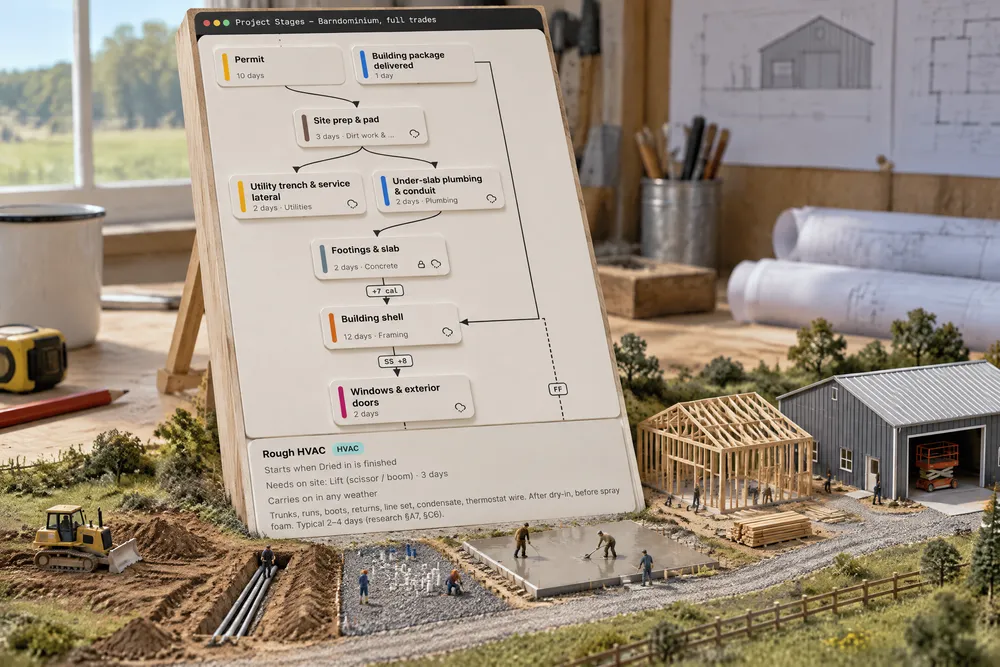
An opt-in starter in Settings → Project Stages for accounts that offer the barndominium build mode. Its stages are linked in research order and each carries the trade that does it and the equipment it needs on site, which new projects copy onto their own stages.
Also called: barndo stages · barndo schedule template · trade stages · equipment needs per stage
Every trade on its own stage, in build order
Try itPad, utility trench, under-slab plumbing, slab, shell, dry-in, rough HVAC, plumbing and electrical, rough-in inspections, spray foam, drywall, paint, cabinets, septic, trim and start-up, finals — each a stage, linked in order. HVAC rough-in waits on dry-in and comes before spray foam; septic waits on the heavy shell work and comes before final grade. Durations inside a published typical range say so; the rest are marked as placeholders for your own crews' numbers. The links work like any other stage dependency.
The barndo schedule had no stage for septic or rough HVAC, so they were remembered, or not.
A barndo starts from a map that already knows the trades, instead of a pole-barn template patched by hand.
The trade and the equipment ride on the stage
Try itUnder each stage in Project Stages, Trade & equipment names the trade that does it and the machines it needs on site — septic: a mini excavator for 3 days, a skid steer, a dump trailer. New projects copy it. The trade suggests each trade's stages on the project; the equipment shows up as demand on company equipment tracking.
Two jobs needed the only skid steer on the same day, and nobody saw it coming.
Set once on the building type, it feeds the trades and the equipment plan on every job.
- 1Add it as a new building type; existing building types are never touched.
- 2Each stage names its trade, so a trade's stages are suggested automatically on the project's Trades section.
- 3Each stage lists the equipment it needs (mini skid, trencher, mini excavator, dump trailer, lift…), which the equipment schedule reads as upcoming demand.
- 4Durations inside a published typical range say so; the rest are marked as placeholders for the builder's own numbers.
A barndominium job is a sequence of trades, and the order matters — HVAC rough-in after dry-in and before spray foam, septic after the heavy shell work and before final grade. Starting from a map that already knows the trades and the equipment saves the builder rebuilding it, while only claiming durations where a source gives a range.
- Barndo schedules had no trade or equipment on their stages.