How should post frame construction stage dependencies be set up?
Link each stage to the one it waits on and say how: after it finishes, when it starts, or finishing together, with cure time in working or calendar days. That's what post frame construction stage dependencies are for: when the slab slips three days, framing moves with it. Add gates so a stage stays locked until its purchase order is sent, the inspection has passed or a checkpoint is ticked.
- People plan from the best-case story of how a job will go and set aside what happened last time, so they underestimate how long their own tasks take. A build order held in one person's head carries that optimism; links that carry the waiting stages along when one slips don't. Buehler, Griffin & Ross, 1994 ↗
- Order is physical on a post-frame job: permits come before anything starts, subs need lining up 6 to 12 weeks before they're needed, and the mechanical trades follow dry-in in a fixed order. Hansen Pole Buildings, 2026 ↗
- Trusses run on their own clock. In the post-COVID crunch, outside truss plants took 4 to 6 weeks just to send back a preliminary drawing, then months to deliver. That's why framing should stay locked until the order is out. Hansen Pole Buildings, 2024 ↗
- In a vendor survey of 400 construction professionals, weather was the most-named cause of delay (43%), ahead of material shortages (35%). A schedule has to absorb slips, not assume there won't be any. Mobilization Funding (vendor survey), 2025 ↗
In a stage's window, Waits on links it to the stages that come first. Each link says how: After it finishes, When it starts or Finish together, with a wait in working days (the crew's week) or calendar days (concrete cures on a Sunday too) — and a negative wait overlaps two stages. Every link reads back as a sentence, so nobody has to learn scheduling shorthand. Move or lengthen a stage and the waiting stages move with it by the same number of working days, so a gap you left on purpose is kept; nothing is ever put before its earliest day, and a notice says what moved. A stage that has started or finished is history: no link ever re-dates it, though its dates still hold the stages behind it. A stage marked Booked — a sub, a crane, a pour truck — is never moved by a link: when what it waits on runs into it, you're told instead. Can't start before holds a stage to a delivery date, and the window says how many days the stage can slip before it moves anything else. Beside the links sit the gates: needs a purchase order, needs a passed inspection, and checkpoints that must be ticked first. While anything is outstanding the stage carries a lock that names what it is waiting on, and the schedule won't mark it in progress — an admin can start it anyway, with a note that stays on the job. The operating system built exclusively for post-frame and barndominium builders: the framers can't go until the slab has cured and the footing inspection has passed, and now the schedule knows it.
Also called: schedule dependencies · predecessor · lag between stages · cure time · locked stage · can't start until the inspection passes · stage dependencies · finish to start · needs a purchase order · needs a passed inspection · start anyway with a note · start to start · finish to finish · overlap stages · negative lag · calendar days · booked sub · pinned date · can't start before · start no earlier than · free float · checkpoint gate
A lock on the schedule says what each stage is waiting on
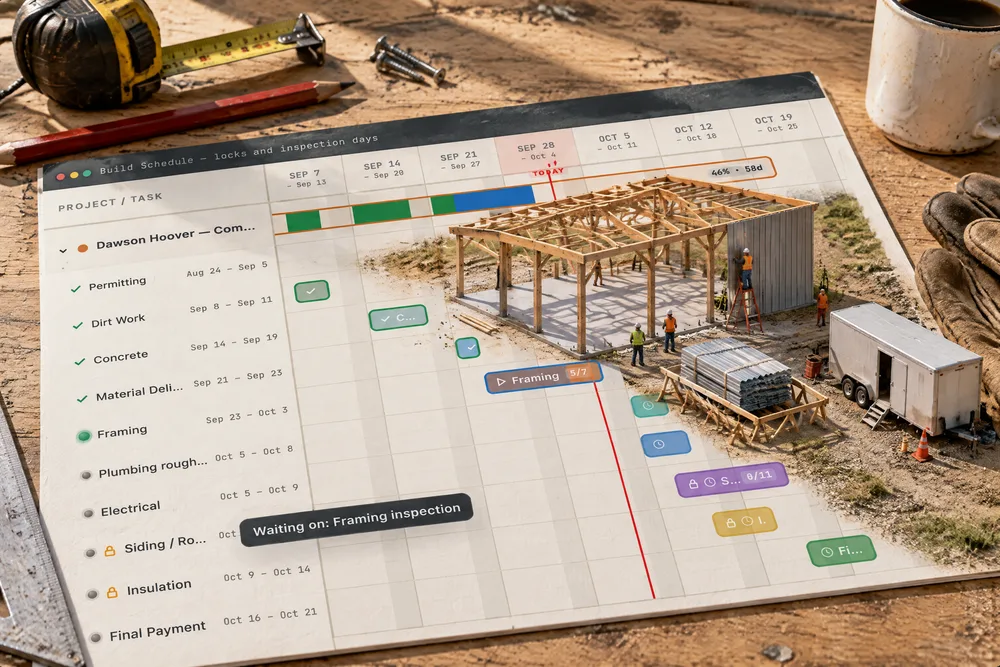
Try itOn Dawson Hoover's shop, two stages carry a padlock on the bar and beside the name. Hover them: Siding / Roofing — Waiting on: Framing inspection; Insulation — Needs a PO. The framing reinspection sits above the Framing bar as a teal diamond on its day. A stage that isn't waiting on anything looks exactly as it always did.
Siding was on the board for Monday, and nobody remembered it was waiting on a framing reinspection.
The project manager sees what is holding a stage up on the screen he books crews from, so nobody is sent to a stage that can't start. The owner reads the whole job's readiness in one glance instead of asking three people.
A stage waits on the stages in front of it — plus cure time
Try itIn a stage's window, Before this stage can start lists what it Waits on: Framing waits on Concrete, + 2 working days for the slab to cure. The window works out the Earliest start from that, and the stage is never put before it. Change the wait and watch the date move.
Framing got booked the morning after the pour because the cure time lived in one man's head.
The project manager writes the cure time down once, on the stage, instead of carrying it in his head for every job. The framing crew never turns up to a slab that is a day too green.
Move one stage, and the stages waiting on it follow
Move or lengthen a stage and every stage waiting on it moves by the same number of working days — either direction — so a gap you left on purpose is kept. Nothing is ever put before its earliest day. A stage that has already started or finished is history, not plan: no link moves it, and it never raises a clash. And the schedule says what it did: 1 stage moved to keep what it waits on, naming each stage and the day it now starts.
Concrete slipped two days, and framing, steel and the walk-through all sat on the old dates until somebody dragged them by hand.
The project manager moves one bar when the concrete sub slips, not six, and a notice tells him exactly what followed. A schedule that moves things silently is one nobody trusts; one that says what it moved is a tool doing what it was asked.
Counted in the days the crew actually works
Waits and moves are counted in the working days of the job — the company's week, the crew's, or the job's own. A two-day wait after a pour that finishes on Friday means framing can start Wednesday for a Monday-to-Friday crew; for a crew that works Saturdays, the Saturday counts as one of the two. When the wait is something that happens on its own — concrete curing, a fabricator's two weeks — switch the link to calendar days and the weekend counts. How the working days are set is working days.
A "two-day" cure counted over the weekend had the framers on the slab first thing Monday.
The project manager's dates match the days his crew really works, so a Monday start is never secretly a weekend nobody counted. The schedule speaks in crew days because that is how a builder thinks about time.
Start together, finish together, or overlap
Try itNot every stage waits for the one before it to finish. When it starts lets two run side by side — rough electrical starts when rough plumbing starts; roof panels start two working days after the steel frame starts. Finish together ties the finishes — Dried in finishes when the roof, walls and windows do. A negative wait overlaps them: −2 after it finishes starts this stage two days before the other ends. Each link reads back in words — Starts 2 working days after Steel frame starts — on the stage and on the dependency map. Switch a stage off when you start the job and whatever waited on it waits on what came before it instead, as a plain after it finishes — the switched-off stage's own rule doesn't carry over.
Plumbing and electrical rough-in were chained end to end, and the schedule showed the house a week later than the crews would actually finish it.
The trades that really run together are drawn together, so the schedule shows the rough-ins overlapping the way the PM books them, not stacked end to end into a month nobody needs.
A booked stage never moves on its own
Try itMark a stage Booked — don't move it automatically and no link ever moves it: the crane, the pour truck and the sub keep their day. When a slipped stage in front of it means it can no longer start then, the schedule says so in red — booked for Thursday, now can't start before Monday — and leaves the decision to you: move the booking, or speed up what's in front.
The schedule pushed the crane rental two days along with the framing, and nobody told the crane company.
A booking made with somebody outside the company is a promise, and software quietly re-dating it would break the promise without telling anyone. The clash shows up the moment it exists, while there's still time to call.
Can't start before the delivery
Can't start before holds a stage back to a date — the day the trusses land, the day the permit is issued. The stage is never scheduled earlier, however early what it waits on finishes, and it shows in the stage's Earliest start.
Framing finished early on paper and pulled the truss crew forward to a day the trusses weren't there.
A crew booked against a delivery date that hasn't come yet is a crew standing in a field. The date sits on the stage it holds back.
Wait on one checkpoint, not the whole stage
Try itA stage can wait on a checkpoint inside another stage instead of the whole thing — the slab waits on Underground plumbing inspection passed, the countertops on Countertop template taken. Until it's ticked the stage carries the lock: Waiting on: Under-slab plumbing › Underground plumbing inspection passed. Checkpoints can wait on checkpoints too — see stage checkpoints.
The plumber was done, the stage said complete, and the slab was poured before the underground inspection had passed.
The thing that really holds a pour is the inspection, not the end of the plumbing stage. Waiting on the exact checkpoint means the slab crew is booked the day the inspector passes it.
How many days a stage can slip
Try itEvery stage window says how much room it has: Can slip 2 working days before it moves Roof panels, or No room: a day late here is a day later for the finish. A stage behind it that's already done doesn't count against it. The stages with no room are the critical path — the chain that sets the finish date.
Every late stage got the same panic, including the ones with a week of slack behind them.
The PM knows which late stage is a phone call and which one moves the customer's move-in date — before the customer asks.
Needs a passed inspection
Pick Needs a passed inspection and choose the stage whose inspection must pass first. Siding / Roofing points at the Framing inspection: until an inspection linked to Framing has passed — and none is sitting failed — the window shows Waiting on: Framing inspection · It hasn't passed yet, and the stage can't be started. It unlocks by itself when the reinspection is recorded passed in permits and inspections.
The siding went on before the framing reinspection, and the inspector had them pull it off the south wall.
The project manager can't accidentally put steel over framing the county hasn't signed off, and the siding crew never closes up work an inspector still needs to see. The rule lives on the stage, so it holds on the busiest week.
Needs a purchase order
Try itSwitch on Needs a purchase order and the stage stays locked — Needs a PO — until a purchase order linked to that stage has been sent. On Dawson Hoover's shop, Insulation waits for its PO; the moment one goes out linked to Insulation — say, a subcontract purchase order — the lock lifts.
The insulation crew showed up and the material had never been ordered.
The office can't book a crew for work nobody has ordered or contracted, so nobody stands around a job waiting for batts that were never bought. The owner sees the missing order before it costs a crew-day.
Two stages can't wait on each other
Try itThe list of stages to wait on leaves out any stage that already waits on this one, directly or down a chain, and says so: One stage isn't offered — it waits on this one, so it would be circular. Concrete can't be set to wait on Framing, because Framing waits on Concrete.
Two stages each set to wait for the other would leave both stuck, with nobody sure why.
The project manager never builds a schedule that can't be satisfied, and never has to untangle one. The mistake simply isn't offered.
A locked stage won't start — an admin can override, with a note
Try itOn the schedule, setting a locked stage to In Progress opens a box instead: Siding / Roofing can't start yet, with what it is waiting on. An admin can Start anyway — only after saying why, and the note is kept on the job with your name. Anyone else is told it unlocks by itself once those are done, or that an admin can start it.
A stage got marked started on a guess, and nobody could say later who decided it or why.
Nobody in the office starts a stage by accident, and when the owner decides to start early he does it deliberately, on the record. The project manager isn't stuck either — the way past the lock is one sentence.
The reason for an early start stays with the stage
After an override, the stage's window carries the note — Started before it was ready by Amy Lapp, the day, and her words: Batts are on site and the crew is here — the PO goes out this afternoon. It sits where the lock used to be.
Weeks later nobody could remember why insulation started before the PO went out.
Weeks later, when the owner asks why insulation started before the purchase order, the answer is on the stage in the words of the person who decided. Accountability without a meeting.
The inspection record unlocks the next stage
The inspection gate reads straight from the job's Permits & inspections: Framing's visit 2 is booked, so Siding / Roofing stays locked; record it Passed and the lock lifts with nothing else to do. A gate pointed at a stage with no inspection yet says so — add one in Permits & inspections.
The inspection passed on Tuesday; the siding crew heard about it on Thursday.
Whoever records the inspector's result is also, without an extra step, the person who unlocks the next crew. One entry does both jobs, so the schedule is never a step behind the county.
- 1Open a stage's window and add the stages it waits on.
- 2Choose how: After it finishes, When it starts or Finish together, with a wait in working or calendar days — negative overlaps them.
- 3Stages that would make a loop aren't offered.
- 4Switch on needs a purchase order, pick the stage whose inspection must pass, or add checkpoints that must be ticked first.
- 5Mark a stage Booked so links never move it, or give it a Can't start before date.
- 6A locked stage shows a lock on its bar and beside its name, and says what it is waiting on.
- 7Starting it from the schedule is refused until it is ready — an admin can override with a note.
- 8Move a stage and the stages waiting on it follow, by working days, and a notice names each one — a stage already started or finished stays where it happened.
- 9A job with no stages linked schedules exactly as it always did.
Every stage moved on its own, so a slab that slipped three days left framing booked on the old date — and nothing stopped a crew being marked started on a stage whose footing inspection had failed or whose trusses had never been ordered. The order of a build lived in the PM's head. Now the schedule knows what each stage is waiting on, carries the waiting stages along when the one in front moves, and refuses to start a stage that isn't ready unless someone accountable writes down why.
- Stages that don't move when the stage in front of them does
- Work started before the purchase order or the inspection it needs
- No record of why a stage started early