How should I handle barndominium selections and allowances?
Put each allowance on the job with a decide-by date, show the customer the options with the price change in front of them, and turn any overage or credit into a change order the day they pick. That keeps barndominium selections and allowances from turning into a surprise at the final invoice. Our selections let customers choose on their own project page and type their name to choose.
- Too many options stall the decision. In Iyengar and Lepper's field study, 30% of shoppers bought from a display of 6 jams, against 3% from a display of 24, and people offered fewer choices were more satisfied with what they picked. It is a reason to keep each allowance's list short enough to decide. Iyengar & Lepper, 2000 ↗
- A cost people can see at the moment of choice changes the choice. When stores posted prices with tax included, demand fell 8%, with the same tax as before. Showing what each option does to the total stops 'the nicer one' becoming a surprise in the fall. Chetty, Looney & Kroft, 2009 ↗
- An overage found at the final invoice is felt as a loss, and losses weigh more than equal gains. Prospect theory's value curve is steeper for losses, which is why the same upgrade feels fine at the showroom and feels like a betrayal on the last bill. Kahneman & Tversky, 1979 ↗
Barndominium contracts carry allowances — money for flooring, cabinets, countertops and lighting the customer chooses later. Each allowance on the job lists its options with your cost and their price; the customer chooses on their own project page, seeing exactly what each option does to their total, and types their name to choose. Approve the pick and the difference goes on the contract as a change order — approved if they chose it themselves, a draft to sign if you recorded it for them — and you can order it at cost from the supplier or sub in the same place. Every option can carry its product page, a picture and its specs — paste the product's link and the photo, name, description, price and SKU fill in from the page, wherever the store lets its page be read (where it won't, the link is kept and you type the rest) — and when the maker stops making it, the original choice is kept on record while the replacement is linked to it. With selection planning switched on (it is a per-account switch, off until you turn it on), it starts in the budget: each line item says where it goes in the home, and switching on Selection required puts it on the selections list and the customer's page, grouped by location. Each selection ties to the stage it's installed in and the supplier's lead time, so its order-by date comes off the schedule and moves when the schedule moves. And what was actually bought — the store, order number, dates and price paid — is recorded: the budget takes the price paid, and the House Book shows the purchase, never the price. We build exclusively for post-frame and barndominium builders, so allowances work the way a barndo contract actually carries them.
Also called: allowances · selections · customer selections · finish selections · allowance overage · upgrades · selection sheet · barndominium selections · flooring allowance · cabinet allowance · selection required · order by date · lead time · product link · purchase record
An allowance is money that's already in the contract
Each allowance is a line in the job's Selections & allowances card, headed by where it goes in the home: what it's for, how much the contract already includes, where it stands — waiting on the customer, chosen and needing your approval, approved, ordered — the decide-by date, and what the pick does to the allowance, in money, on the right. The closed card says the rest: 1 to approve · 2 waiting on the customer · +$1,300 vs allowances.
The cabinets aren't chosen, nobody notices until the drywall is up, and the job waits three weeks on an order that could have gone in a month ago.
The owner wants one place that answers "what's still undecided, and what has it cost us" without reading texts. Seeing open choices with a date beside them gets them decided before the crew needs them — and choices made on time are a job that finishes on time.
Planning selections from the budget is a switch you turn on
Try itRunning selections from the budget is set per account and is off until you turn it on: Settings → Subs & Purchasing → Selections → Plan selections from the budget. On, each job's Budget & margin card gets Line items, and each selection takes the stage it's installed in and the supplier's lead time, so its order-by date shows on the schedule. Off, the selections card works the way it always has — and the location box, paste-a-link and the purchase record are there either way.
A new feature that rearranges every builder's budget card the morning it ships.
A builder's workflow only changes when he decides it should. The planning layer is there for the builders who run selections from the budget, and out of the way for the ones who don't.
Start in the budget: where it goes, and whether the customer picks it
Try itWith planning on, the job's budget & margin card carries Line items — each item with its location, its budget and a Selection required switch. Switch it on and the line joins the selections list and the customer's page straight away; switch it off and it asks first, keeps its options, and stays in the budget as Builder's choice. A line the customer has already chosen on can't be switched off. Each row says where it stands — Waiting on the customer · 2 options, Chosen: … — approve it, Approved · $6,350 · Buy (the Buy link opens the product page), Purchased Oct 2 · paid $8,000 (what was paid shows only to people who can see costs) — with its order-by date under it.
The selections live in a spreadsheet beside the budget, and the item nobody copied across is the one that holds up the trade waiting to install it.
The budget and the selections stop being two lists. Every item the customer has to choose is on the budget the owner reads, and every budget line the customer picks is on their page — nothing falls between them.
Every line says where it goes — the job's own rooms are suggested
Try it+ Add line asks for the item and its location — Kitchen backsplash, Master vanity, Kitchen island. Under the box come the locations already on the job, then — when the job has a 3D design — the rooms on its floor plan, then the usual places; type to narrow them, tap one to fill it, or write your own. The selections card's + Add asks for a location too, with or without planning. The location heads each row on the selections card, and on the customer's page it becomes the heading their choices are grouped under.
Two backsplashes and two vanities on one job, one vague line each — and the tile for the mudroom goes up in the kitchen.
"Backsplash" is a guess; "Kitchen backsplash" is an order. Placing every item in the home is what lets the customer choose room by room — and the crew install the right box in the right room.
Every option has your cost and their price — at your markup
Try itOpen an allowance and each option shows your cost, the customer's price, and what it does to the allowance: cost $8,000 · price $9,600 · $1,600 over the allowance. Type a cost into a new option and the price fills itself at the job's markup — set once on the job's budget & margin card — and you can change it for that one option.
The LVP is quoted at the supplier's $8,000 because that's the number on the sheet, and the upgrade the customer loves makes the builder nothing.
Upgrades quoted straight off a supplier sheet leave the builder's margin on the showroom floor. When the markup goes in by itself, nobody has to remember it on a busy day — and every upgrade a customer picks earns what the rest of the job earns.
Paste the product's link — the details fill in where the store allows it
Try itOpen a selection, paste a product page into Paste a product link and press Fill from link. Where the store's page can be read, its own photo, name, description, price, SKU and store come back for you to check — Use these or Not this; nothing is saved until you add the option. When the price is per unit, set the Quantity — square feet for tile and flooring, fixtures for lights — and the store's price times the quantity goes in as your cost, with the customer's price at the job's markup. Re-check price later says whether the store's price has moved. Some stores block automatic readers: the box says so and offers Keep the link — the page goes into the option's product details, so the customer still gets View the product, and you type the name and your cost yourself.
Every option copied by hand from a store page — the name, the price, the SKU, a photo saved to somebody's desktop.
The option the customer sees is the product's own page, not the office's retyping of it. And when a store won't be read, you're told plainly instead of getting a half-filled guess.
The customer chooses on their own page — and sees what it does to their total
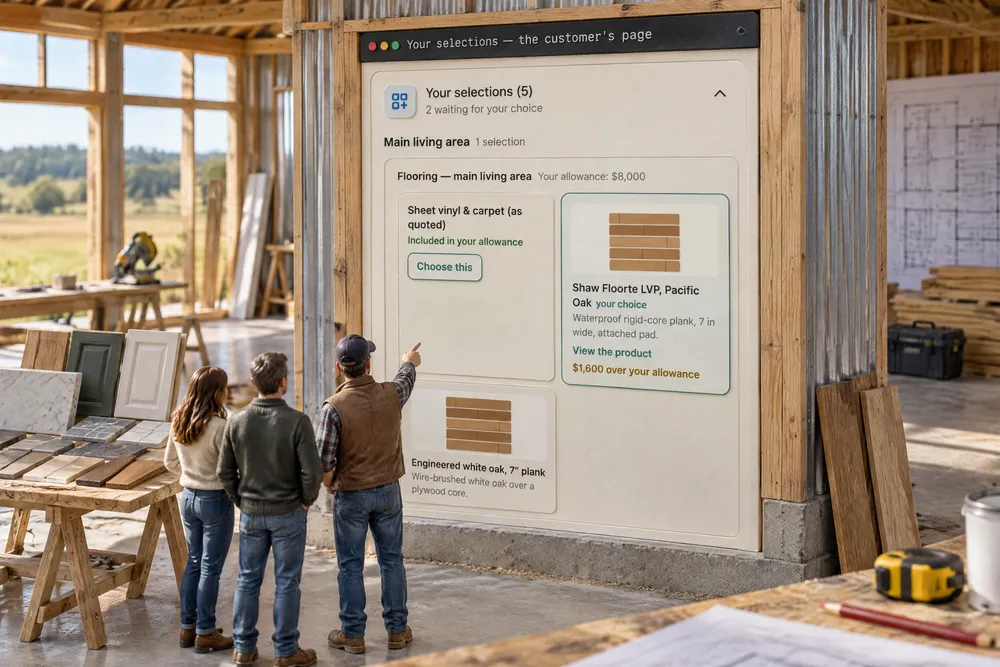
Try itOn their project page, Your selections lists each allowance with Your allowance: $8,000, and every option with what it does to their total — Included in your allowance, $1,600 over your allowance, $300 credit. Choose this asks them to type their full name, and says plainly that if you approve it, that amount is added to — or taken off — their contract. Until you approve it they can still change their mind; an approved pick locks, with a note to ask you if they'd like to change it. The moment they choose, your office gets Customer made a selection — Renee Hostetler chose Shaw Floorte LVP, Pacific Oak for Flooring — main living area ($1,600.00 over the allowance). Approve it in the project's Selections card. — in the app and, by default, by email to admins, project managers and sales managers.
The customer chooses at a showroom, the overage is mentioned once in passing, and the final invoice is the first time they see it in writing.
People stand behind a choice they made themselves, with the price in front of them. When the homeowner picks on their own phone, in their own time, it stops being "what the builder charged me" and becomes "what we chose" — and that takes the heat out of the final invoice.
Their page, room by room
Try itWhen selections carry locations, Your selections groups them — Kitchen backsplash · 1 selection, Kitchen island · 1 selection — in your order. Each option shows the store's photo, its description — the first three lines, however much copy the store's page had; the rest is on the product page — and its specs (a quantity rides along as one), View the product, and what it does to their total; Choose this asks for their name. A line you've left as Builder's choice never appears, and neither does your cost or what you paid.
A long list of selections in no order, and the customer can't tell which tile goes where.
People choose a house a room at a time. Grouping by location turns a list of line items into the kitchen they're picturing — which is how decisions get made on time.
Your cost never reaches the customer's page
The same option on two screens. Yours shows cost $8,000 · price $9,600. Theirs shows $1,600 over your allowance — and nothing else. The customer's page is sent prices and differences only; your cost stays on your side.
An upgrade sheet emailed as a spreadsheet goes out with the cost column still in it.
A customer who sees the builder's cost starts negotiating the markup instead of choosing the flooring. Keeping cost private lets the builder price fairly without defending every percent — and keeps the conversation on the house, where it belongs.
Approving a pick writes the change order
Approve selection shows the option and what it does — Shaw Floorte LVP, Pacific Oak — $1,600 over the allowance — and what happens next. A credit goes on the contract the same way an overage does, as a minus; a pick at exactly the allowance changes nothing on the contract. The new change order appears in the job's change orders without a reload.
The upgrade was approved on a call, the change order was going to be written "tonight", and by spring nobody can find it.
The change order is the paperwork everyone means to write and nobody does. Writing it from the approval means the office never has to remember — and a contract that always matches what the customer chose is one nobody argues about.
Their pick is approved; a pick you record goes out to sign
Who made the choice decides what kind of change order it becomes. A choice the customer made on their own page, with the price on screen and their name typed, is their approval — the change order goes on Approved and counts in the contract at once. A choice you recorded from a phone call becomes a Draft for them to sign the usual way, on their change orders.
The countertop upgrade was agreed on the phone, billed on the next invoice, and disputed — because the customer never saw it in writing.
A signature only means something if the person saw what they were signing. Treating the customer's own on-screen choice as approval saves a round trip; treating a phone call as a draft protects the builder from "I never said that." Both keep the record honest.
The change line carries your cost, so the budget moves with it
The change order an approved pick writes isn't just a price. Its line carries the share of the option's cost the overage represents — on a $1,600 overage at 20% markup, $1,333.33 of cost — so the job's budget & margin moves by what the upgrade really costs you, not by what you charged for it.
The contract goes up by $1,600, the budget doesn't move, and the job looks $1,600 more profitable than it is.
A margin number is only worth reading if it's right. When every approved upgrade adds its true cost to the job, the owner can trust the margin he sees — and act on it while there are still choices left to make.
Order it at cost, from the same card
Try itOnce a pick is approved, choose who supplies or installs it — the list is your subcontractors and suppliers — and Draft purchase order writes a PO at the option's cost, tagged to the allowance's phase, ready to send from Orders. The budget counts it as committed the moment it's sent.
The customer picked matte black, the order went in as chrome from an old email, and the plumber stood in an empty bathroom.
The moment a customer decides is the moment the order should go in. Ordering from the same card keeps the choice and the purchase from drifting apart — the right fixtures arrive on time, and nobody re-keys a part number at nine at night.
The order-by date comes off the schedule
Try itWith planning on, each selection takes the stage it's installed in and the supplier's lead time, and works out Order by — that stage's start less the lead time: Order by Sep 28 — overdue · 49 days before Flooring & fixtures starts Nov 16. It moves when the schedule moves. Move the stage and the date moves with it. A passed order-by turns red, so does a decision past its decide-by date and a delivery due after install starts — and the closed card leads with them: 1 past order-by · 1 decision overdue. Nothing is texted or emailed about it; the flags are on the screen.
A long-lead vanity is ordered the day the plumber asks where it is.
The date that matters is the one the schedule sets. Working backwards from install day is the step that's easiest to skip in a busy week — here it's done every time the list is read.
The order-by day is tied to its stage's bar
Try itOn the build schedule, every selection still to buy puts a mark on the row of the stage it's installed in, on its order-by day — level with the bar, ahead of it by the lead time, and tied to it by a dashed line that reads Order Vanity by Sep 28 · overdue when there's room. It moves when the bar moves. Orders due the same day share one mark with a count on it. Amber while it's coming, red once it has passed; hover or tap it for the full list — Order Master vanity — Vanity by Sep 28 — overdue. Once it's bought, the mark is gone.
The schedule looks on track while a long-lead item is already late.
What has to be ordered shows where the job is planned — and you can see which stage it belongs to. The order-by day is often weeks ahead of the stage; the line back to the bar means whoever scans the schedule sees the late order, and what it holds up, without opening a single card.
Mark purchased — what was actually bought, and why
Try itOn an approved selection, Mark purchased asks What was bought: The approved one, or A different product (discontinued or long lead). A swap goes the same way as a discontinued product — the approved one stays on record marked Discontinued, Lead time too long or another reason, the replacement is linked to it, and the approved change order doesn't move unless you write one. Then the store, order #, date ordered, Price paid (your cost), expected delivery and delivered date. The price paid lands in the budget's actual cost (unless a purchase order already counts it), and the House Book shows the purchase — the store and the dates, never the price.
The countertop that arrived isn't the one approved, and the only record of why is a text from the supplier.
The record matches what's on the wall. When a slab's lead time forces a swap, the customer sees what replaced their pick, the contract only moves through a change order, and the margin counts what was really paid.
Each option carries its product — page, picture and specs
Try itAdd an option and open + Product page, picture & specs: paste the product page (it opens for the customer in a new tab), add a picture or leave it empty and the page's own picture is copied into your storage, and list the specs as rows — Finish: Matte black · Model #: PF-2210-MB · Flow rate: 1.8 gpm. The customer sees the picture, the specs and View the product on their page.
An option called 'the black faucet' is a guess at order time — which black, which model, from which page.
The customer picks the actual product, not 'the black one'. Because the picture is copied when you save it, a supplier page that moves or disappears never blanks out what they chose — and the office orders exactly what's on the selection.
Discontinued? The original stays on record
When the maker stops making it, Mark discontinued. The option stays where it was, greyed — its name, specs, picture, price and link exactly as they were, plus who chose it and when — with Discontinued 9/29/2026 by Ridgeline office — Supplier discontinued the matte black finish. It can't be picked any more, the closed card flags 1 discontinued — needs a replacement, and a pick whose product is discontinued can't be approved until it has one.
The faucet they picked is discontinued, somebody swaps it, and by the final invoice nobody can say what was originally chosen.
'That's not what I picked' has an answer, frozen on the day they picked it. The office never argues from memory, and the customer feels looked after when a product disappears mid-build.
Marking it discontinued deletes nothing
The dialog says exactly what happens: the option stays on the selection as the record of what was offered — its name, specs, picture, price and link are kept exactly as they are. Add a note saying why. If it was the customer's choice, the replacement form opens next.
Deleting a dead product deletes the proof of what the customer chose.
Nobody hesitates to mark a dead product when they know nothing is lost. The record stays clean, and the next person on the job can see why it changed.
The replacement points back at the original — and never moves the price
Try itAdd replacement starts blank: the replacement's own name, your cost and a price at your markup, with The original was $389 and +$10 against the original's price underneath. Copy the original's specs to edit brings them over only when you ask, marked as copied. Saved, it becomes the choice and the customer sees what it replaced. A different price never changes an approved selection's change order — if the contract should move, you write a change order.
A replacement that silently changes the price on an approved selection is a change order nobody signed.
A supplier's swap can never quietly rewrite what the customer agreed to pay. The contract only moves through a signed change order, so the margin and the customer's trust both stay intact.
The customer sees what they first chose
Try itOn the customer's page the replacement shows as their choice, with its specs and View the product — and Replaced — originally chose Pull-down kitchen faucet — Matte black on 9/12/2026, which opens to the original's picture, specs, price and link. The same note follows the selection into the House Book at closeout.
'That's not what I picked' — said about a product that no longer exists, with nothing to point at.
Showing the customer their own original choice settles the question before it's asked. They see the swap was handled in the open — which is what keeps a mid-build substitution from becoming a dispute.
The total they read first includes every approved change
The Project Total tile at the top of the customer's page is the estimate total plus every approved change order — the porch, the upgrades and the credits — with incl. $8,150.00 in approved changes under it. A draft they haven't signed isn't counted.
The page said $420,000, the final invoice said $428,150, and the customer felt ambushed by changes they had approved themselves.
The first number a customer sees is the one they remember. When it already includes the upgrades they chose, the final invoice confirms what they expected instead of surprising them — and a customer who's never surprised is the one who sends you the neighbor.
The allowances sit beside the job's margin
The job's Budget & margin card carries the allowances in one line — $35,200 in the contract · $23,350 chosen so far · +$2,150 over · 1 still open — right beside the projected margin and the one markup every change and selection on the job starts from.
Allowance overages live in a notebook, so nobody knows the job's real margin until the last selection is billed.
Upgrades are where a good job's margin quietly moves. Putting them next to the margin lets the owner see the effect while the choices are still being made — control, not hindsight.
- 1Add an allowance — what it's for, how much the contract includes, which phase it belongs to, and the date the customer should decide by.
- 2List the options with your cost; the price fills in at the job's markup and can be changed per option.
- 3The customer chooses on their project page — each option shows what it does to their total, never your cost — and types their name to choose. Your office gets a Customer made a selection notice with the allowance and the option.
- 4You approve the pick. The difference becomes a change order: approved if they chose it with the price on screen, a draft to sign if you recorded it.
- 5The change line carries the matching share of your cost, so the budget moves by what the upgrade really costs you.
- 6Order it at cost — a draft purchase order to the supplier or subcontractor, tagged to the phase.
- 7Their project total includes every approved change, so the number they read first is the real one.
- 8Each option keeps its product — its page, its specs and a saved copy of its picture — and a discontinued product keeps its original record, with Add replacement linking the new one to it.
- 9Start in the budget — switch on Plan selections from the budget in Settings → Subs & Purchasing (it is off until you do). Each line item then has a location ("Kitchen backsplash", "Master vanity" — the job's floor-plan rooms are suggested), and Selection required puts it on the selections list and the customer's page. A line nobody has chosen on can come off again.
- 10Paste a product link and press Fill from link: the page's own photo, name, description, price and SKU come in for you to check. Set the quantity — square feet for tile and flooring, fixtures for lights — and the store's price times the quantity goes in as your cost. Re-check price later says if it moved. Some stores block automatic readers — then Keep the link puts the page on the option and you type the rest.
- 11The customer sees every option grouped by location, with its photo, price and product link.
- 12Approved, the budget line shows the approved price and a Buy link to the product page.
- 13Order by, off the schedule (with selection planning on): pick the stage it's installed in and the lead time, and the order-by date is that stage's start less the lead time. It moves when the stage moves, shows on the schedule bar, and turns red once it's passed; an undecided selection past its decide-by date is flagged too.
- 14Mark purchased records what was actually bought — the approved product, or a different one when it was discontinued or the lead time was too long — with the store, order number, dates and price paid. The price paid lands in the budget's actual cost; the House Book shows the purchase.
On a barndominium, the argument at the end of the job is rarely about the steel. It's about the flooring. The customer picked "the nicer one" at a showroom in spring, nobody wrote down what it did to the price, and in the fall the final invoice is $4,600 higher than the number they remember. Both sides feel cheated, and both are a little right. Allowances exist to stop exactly that, and on paper they do: the contract says $8,000 for flooring, and the customer picks within it or pays the difference. In practice the difference lives in a text message, the upgrade was quoted off a supplier sheet with no markup, and the change order that should have followed never got written. So here the customer makes the choice on their own project page, with the difference in plain words — "$1,600 over your allowance" — and types their name to choose it. Approving it writes the change order. Nobody has to remember to.
- Allowance overages agreed verbally and never billed.
- Upgrade prices quoted at cost, with no markup.
- Customer choices with no record of the price they saw.
- Selections that change the contract without changing the budget.
Selection product records & discontinued items
An option can hold the product page (it opens in a new tab for the customer), specs like finish, size and model number, and a picture copied into your own storage when you save it — so a dead supplier link never blanks the selection. Fill from link can read the page's photo, name, description, price and SKU for you, where the store lets its page be read. When the maker stops making it, Mark discontinued freezes the original — name, specs, picture, price, link and who chose it when — and Add replacement links the new product to it; when what's bought differs from what was approved, Mark purchased swaps it the same way, with the reason kept.